Panasonic Toughbook CF-19: Complete Buyer’s Guide, Specs, and All 8 Generations Explained
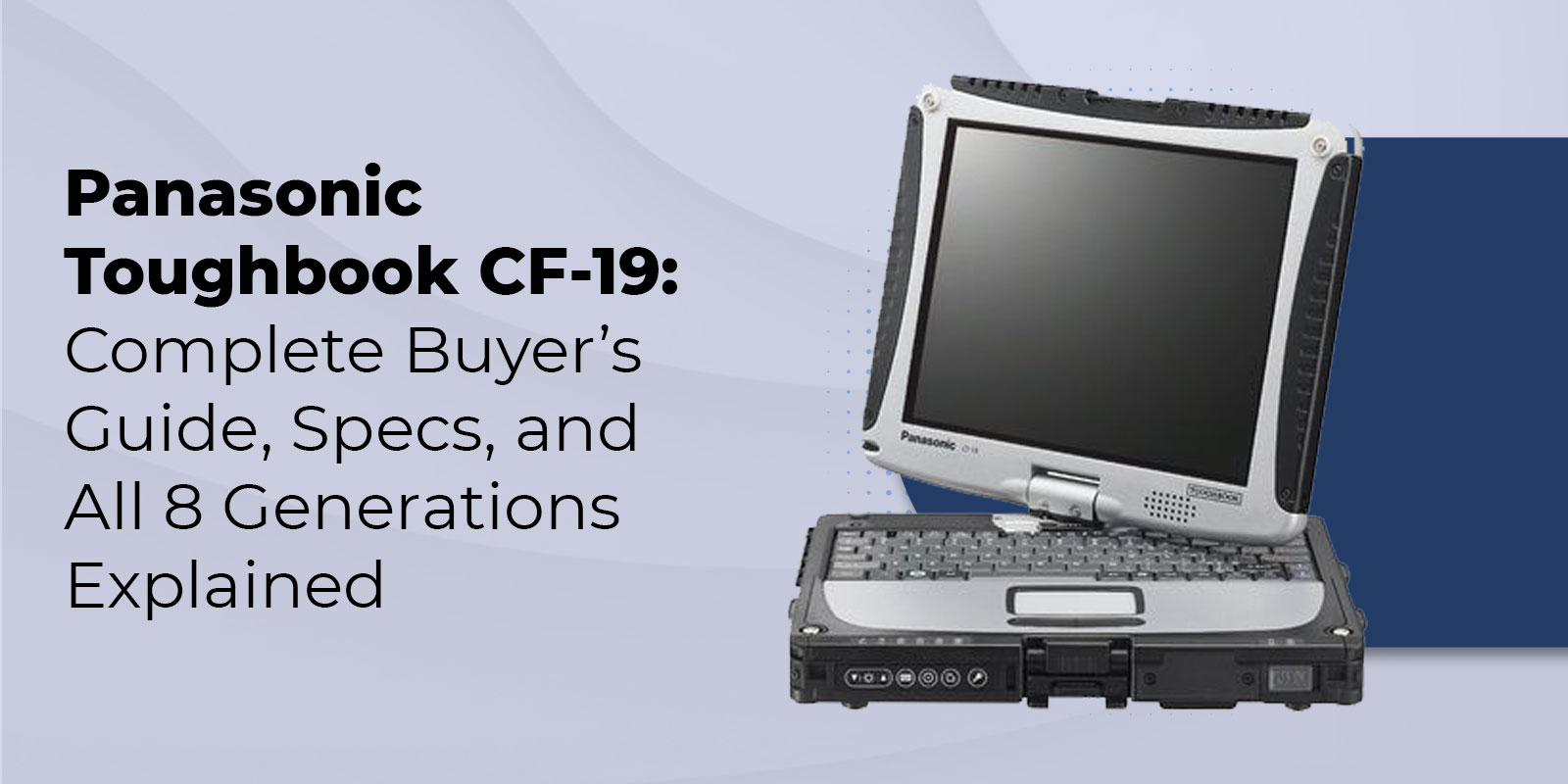
The Panasonic Toughbook CF-19 is a fully rugged convertible laptop that rotates from notebook to tablet mode with a single swivel of its 10.4-inch screen. Certified to MIL-STD-810G, MIL-STD-461G, and IP65 across more than a dozen tests, it was produced in eight generations from 2007 to 2015 and remains a practical choice for field computing in the refurbished market today.
Unlike the semi-rugged Toughbook models, the CF-19 is fully sealed and rated IP65, meaning it is dust-tight and protected against water jets from any direction. Its six-foot drop certification while closed is double the threshold of semi-rugged devices. Combined with a rotating screen that converts it from laptop to tablet in a single motion, the CF-19 occupies a position that few devices in its class could match: compact, convertible, and fully hardened for sustained field use.
In the refurbished market, certified CF-19 units range from $99 to $399, depending on the MK generation and configuration. Demand remains consistent among law enforcement agencies, military and government contractors, field service teams, and healthcare organizations that need Windows 10 compatibility, IP65 protection, and a convertible form factor in a single device.
Browse our refurbished convertible Toughbooks for current availability and pricing, or explore our refurbished fully rugged laptops if a larger non-convertible option better fits your requirements.
This guide covers everything you need to make an informed purchase: full specifications, a breakdown of all eight generations, real-world use cases by industry, and a comparison with the CF-20, CF-33, and FZ-G2 to help you determine whether the CF-19 fits your requirements or whether stepping up makes more sense.
What Is the Panasonic Toughbook CF-19?
Fully Rugged Convertible Design
The Panasonic Toughbook CF-19 is classified as fully rugged, placing it in a distinct category from the semi-rugged Toughbook models that make up a large portion of the product line. That distinction is meaningful: fully rugged devices are built to withstand sustained exposure to rain, dust, mud, and submersion, while semi-rugged models protect against incidental spills and dust but are not sealed to an IP standard.
The CF-19 chassis is constructed from magnesium alloy with rubber gaskets on every port flap and a fully sealed keyboard. IP65 certification means the unit is completely dust-tight and protected against water jets directed from any angle. In practice, a CF-19 can be rinsed under running water to remove field contamination, a task that would damage any semi-rugged device. The six-foot drop certification, while closed handles falls from standing height, which reflects realistic handling conditions far better than the three-foot standard of semi-rugged models.
The rotating screen is the CF-19’s defining feature. By sliding the display release latch and rotating the screen 180 degrees on its central hinge, the user converts the CF-19 from a standard clamshell laptop to a flat tablet in seconds. A built-in hand strap on the back allows single-hand carry in tablet mode, which is common practice among field inspectors, healthcare workers, and first responders. A tethered stylus is present in a slot below the display, preventing loss in the field.
For a detailed comparison of fully rugged and semi-rugged designs in terms of durability, cost, and appropriate use cases, check out our semi-rugged vs. fully rugged laptops guide. Buyers deciding between a convertible and a standalone tablet can also read our rugged laptop vs. rugged tablet comparison before deciding.
Production History and Market Position
Panasonic introduced the CF-19 in 2007 as the successor to the CF-18, continuing a convertible platform that had served field professionals since the early 2000s. Over the eight generations produced through 2015, Panasonic updated the processor, RAM ceiling, display options, connectivity, and camera with each release. In 2016, the CF-20 replaced the CF-19 with a detachable-keyboard design and a lighter chassis, ending the swivel-hinge convertible line.
The eight-generation production run means buyers in the 2026 refurbished market encounter a wide range of CF-19 hardware. MK1 through MK3 units use pre-i5 Intel processors and are limited to Windows XP, Vista, or Windows 7. MK4 through MK8 units use Intel Core i5 processors and support Windows 10 Pro. For most organizations in 2026, MK4 is the practical minimum for a new deployment.
Panasonic Toughbook CF-19 Full Specifications
The table below reflects core specifications shared across the CF-19 family. Generation-specific processor and connectivity details appear in the MK comparison section that follows.
|
Specification |
Details |
|
Display |
10.4-inch XGA LED, 1024×768; up to 6,500 nit transflective sunlight-readable (later MKs); 4:3 aspect ratio |
|
Touch Options |
Touchscreen (stylus + finger) on all MKs; Dual Touch (multi-point + digitizer, glove-compatible) from MK5+ |
|
Processor |
MK1: Core Duo 1.06GHz | MK2–MK3: Core 2 Duo | MK4: i5-540UM 1.2GHz | MK5: i5-2520M 2.5GHz | MK6: i5-3320M 2.6GHz | MK7: i5-3340M 2.7GHz | MK8: i5-3619ME 2.7GHz |
|
Max RAM |
MK1–MK3: up to 2GB | MK4: up to 8GB | MK5–MK8: up to 16GB DDR3 |
|
Storage |
HDD to 2TB SSD (shock-mounted); upgradeable at refurbishment |
|
Rugged Rating |
MIL-STD-810G (12+ tests) | MIL-STD-461G (EMC) | IP65 (dust-tight + water-jet protected) | 6-foot drop while closed |
|
Ports |
2–3× USB (2.0 MK1–MK5; 1× USB 3.0 from MK6+); RS-232 serial; Gigabit Ethernet; ExpressCard/54; SD card; CF card; headphone/mic |
|
Wireless |
802.11 a/b/g/n Wi-Fi; optional Bluetooth (BT 2.0 early MKs, BT 4.0 from MK6+); optional 4G LTE; optional GPS |
|
Camera |
Optional 2MP (early MKs) or 5MP with autofocus and LED flash (later MKs) |
|
OS |
MK1–MK3: Windows XP/Vista/7 only | MK4–MK8: Windows 10 Pro supported | MK7–MK8: Windows 11 via unofficial workaround only |
|
Battery Life |
~7–8 hours standard; up to ~14–16 hours with extended battery pack (later MKs) |
|
Weight |
~5.1 lbs (2.35 kg) with standard battery |
|
Dimensions |
10.7” × 8.5” × 1.9” |
|
Optional Add-ons |
GPS, 4G LTE, 5MP camera, smart card reader, contactless smart card, backlit keyboard, rubber keyboard, hand strap |
MIL-STD-810G + IP65 + MIL-STD-461G Certification Breakdown
The CF-19 holds three distinct certifications that together define its environmental and operational hardening.
MIL-STD-810G covers durability across more than twelve test methods: drop from six feet while closed, mechanical shock, vibration, dust and sand, altitude, humidity, freeze/thaw cycles, rain, explosive atmosphere, and temperature extremes from minus four to 140 degrees Fahrenheit. The six-foot drop standard reflects a fall from standing height, which represents realistic field handling far more accurately than the three-foot threshold of semi-rugged devices.
IP65 provides a precise, internationally standardized ingress protection measure. The first digit, six, indicates complete dust-tightness. The second digit, five, indicates protection against water jets from any direction at a defined pressure and flow rate. IP65 covers rain, splashing, and deliberate rinsing scenarios that field workers routinely encounter.
For the detailed breakdown of what IP65 guarantees and how it compares to IP66 and IP67, see our IP65 rating article. The complete guide to MIL-STD-810G test methods is explored in our MIL-STD-810G certification explained guide.
MIL-STD-461G is less commonly discussed but significant for specific procurement requirements. It certifies that the CF-19 produces sufficiently low electromagnetic emissions and resists external electromagnetic interference, enabling it to operate alongside sensitive radio systems and electronic instrumentation. This certification is required for military and government procurement in many departments and makes the CF-19 appropriate for deployments near emergency radio equipment, avionics, and other RF-sensitive systems.
Display Options and Tablet Mode
The CF-19’s 10.4-inch display runs at 1024 by 768 resolution in a 4:3 aspect ratio. The 4:3 format provides more vertical screen space than widescreen panels, which is practical for viewing forms, inspection checklists, mapping software, and records management interfaces designed for standard aspect ratios.
Later MK generations offer a transflective touchscreen with up to 6,500-nit brightness in reflective mode, making the display legible in direct sunlight without a cover or screen hood. Two screen variants are available across the CF-19 line: a standard touchscreen responding to stylus and single-finger input, and a dual touch model adding multi-point capacitive touch and glove-compatible operation alongside the digitizer.
Toughbook CF-19 Generations: MK1 Through MK8 Compared
The CF-19 was produced across eight mark versions spanning three Intel processor generations. Understanding the MK before purchasing a refurbished unit is the single most important step in the process, as the generations differ significantly in processor performance, RAM ceiling, USB connectivity, Bluetooth version, and operating system compatibility.
MK1 (2007), MK2 (2008), and MK3 (2009) use Intel Core Duo and Core 2 Duo processors with clock speeds under 1.2GHz and RAM ceilings of two gigabytes or less. These generations are limited to Windows XP, Vista, and Windows 7. In 2026, MK1 through MK3 units are practical only for organizations running legacy software on older operating systems. For any deployment requiring Windows 10, MK4 is the minimum starting point.
|
Feature |
MK4 (2010) |
MK5 (2011) |
MK6 (2012) |
MK7 (2013) |
MK8 (2014–15) |
|
Processor |
i5-540UM |
i5-2520M |
i5-3320M |
i5-3340M |
i5-3619ME |
|
Clock Speed |
1.2GHz (Turbo 2.0) |
2.5GHz (Turbo 3.2) |
2.6GHz (Turbo 3.3) |
2.7GHz (Turbo 3.4) |
2.7GHz (Turbo 3.3) |
|
CPU Generation |
Arrandale (1st) |
Sandy Bridge (2nd) |
Ivy Bridge (3rd) |
Ivy Bridge (3rd) |
Ivy Bridge ME (3rd) |
|
Max RAM |
8GB |
16GB |
16GB |
16GB |
16GB |
|
USB 3.0 |
No |
No |
1× USB 3.0 |
1× USB 3.0 |
1× USB 3.0 |
|
Bluetooth |
BT 2.0 opt |
BT 3.0 opt |
BT 4.0 opt |
BT 4.0 opt |
BT 4.0 opt |
|
Ambient Light Sensor |
No |
No |
Yes |
Yes |
Yes |
|
Windows 10 |
Yes |
Yes |
Yes |
Yes |
Yes |
|
Windows 11 |
Not supported |
Not supported |
Not supported |
Via workaround only |
Via workaround only |
|
Best For |
Budget, Win10 basics |
Strong value pick |
USB 3.0 + BT 4.0 |
Recommended |
Extreme temps, top spec |
|
Refurb Price |
~$99–$149 |
~$149–$199 |
~$199–$249 |
~$249–$299 |
~$299–$399 |
Which MK Version Should You Buy?
The MK4 is the Windows 10 entry point. The Arrandale i5-540UM processor runs at 1.2GHz with Turbo Boost to 2.0GHz. Performance is modest by current standards but adequate for dispatch, basic forms, and record lookup applications. The eight-gigabyte RAM ceiling is a practical limitation for multitasking but workable for single-purpose field deployments. At $99 to $149 for a certified refurbished unit, the MK4 is the most affordable CF-19 available.
The MK5 delivers a significant performance step up. The Sandy Bridge i5-2520M runs at 2.5GHz, more than double the MK4’s clock speed, and the RAM ceiling rises to 16 gigabytes. For organizations that need Windows 10 performance without the budget for MK6 or later, the MK5 at $149 to $199 is a strong choice.
The MK6 is the first CF-19 with USB 3.0, Bluetooth 4.0, and an ambient light sensor. The Ivy Bridge i5-3320M improves efficiency over Sandy Bridge while maintaining competitive clock speeds. For teams that need USB 3.0 peripheral compatibility or Bluetooth 4.0 for modern wireless accessories, the MK6 is the minimum recommended generation.
The MK7 brings a modest clock speed increase over the MK6 (i5-3340M at 2.7GHz versus 2.6GHz), and the dual touch screen is widely available on MK7 units. For most buyers, the MK7 represents the best overall value in the upper CF-19 range.
The MK8 is the highest-specification CF-19 available. Its i5-3619ME processor uses the Mobile Express platform, a third-generation Ivy Bridge variant rated for a wider operating temperature range. This extended thermal tolerance makes the MK8 the right choice for deployments in extreme heat or cold. Windows 11 is not officially supported on any CF-19 generation. MK7 and MK8 units can run it via unofficial workarounds, but driver instability for the touchscreen and digitizer is a documented issue. Windows 10 Pro remains the recommended operating system for all CF-19 deployments.
Industries and Use Cases for the Toughbook CF-19
Law Enforcement and Public Safety
Law enforcement agencies have deployed the CF-19 extensively since its introduction, both in patrol vehicles and on foot. In a patrol car, the CF-19 connects to CAD and RMS systems through a vehicle docking station while IP65 protection handles the rain, spills, and rough handling that in-vehicle patrol work involves. Tablet mode enables digital signature capture, scene documentation using the optional camera, and mobile form completion without additional hardware.
MIL-STD-461G certification ensures the CF-19 does not interfere with emergency radio systems during tactical operations, a requirement that eliminates most consumer and business laptops from law enforcement deployments.
Our guide on why police departments choose rugged laptops covers the specific requirements in detail. For department-level procurement guidance, visit our police laptops page. Our vehicle mounts selection includes docking options compatible with the CF-19 for in-vehicle deployments.
Field Service, Military, and Emergency Response
Field service technicians and military users benefit from the CF-19’s combination of IP65 sealing, MIL-STD-461G EMC certification, integrated GPS option, and built-in RS-232 serial port. The serial port connects legacy diagnostic instruments, meters, and monitoring equipment that still require serial communication, a requirement that keeps CF-19 deployments active in utility maintenance, telecommunications infrastructure, and military maintenance roles years after the platform’s original production run.
For more on the field-specific requirements that drive rugged laptop selection, our rugged laptops for field work guide covers the key criteria. For government and defense procurement requirements, visit our military laptops page.
Healthcare, Inspection, and Transportation
The IP65 rating allows the CF-19 to be cleaned and disinfected with liquids, a practical requirement for healthcare workers who move between patient areas and need a device that meets infection control standards. Tablet mode with stylus input supports point-of-care data entry and patient identification without additional peripherals. Construction inspectors and utility workers benefit from the compact 10.4-inch form factor in tight spaces and elevated access areas. Transportation and logistics operations use the 4G LTE and GPS options available on later MK generations for real-time tracking and route management.
CF-19 vs. CF-20 vs. CF-33 vs. FZ-G2: Which Should You Choose?
The CF-19, CF-20, CF-33, and FZ-G2 each occupy a distinct position on the price and specification curve for Panasonic’s fully rugged convertible and tablet lineup. Choosing the right device depends on budget, display resolution, operating system requirements, form factor, and how long the device needs to remain in active field service.
|
Feature |
CF-19 (Refurb) |
CF-20 (Refurb) |
||
|
Form Factor |
Swivel convertible |
Detachable 2-in-1 |
Detachable 2-in-1 |
Tablet only |
|
Display |
10.4” XGA 1024×768 |
10.1” FHD 1920×1200 |
12” QHD 2160×1440 |
10.1” QHD 2160×1440 |
|
Price Range |
$99–$399 (refurb) |
$299–$599 (refurb) |
$599–$1,599+ |
$799–$2,499+ |
|
IP Rating |
IP65 |
IP65 |
IP65 |
IP65 |
|
MIL-STD-461G |
Yes |
Yes |
Yes |
Yes |
|
Windows 11 |
Not official |
Select configs |
Yes — fully supported |
Yes — fully supported |
|
Serial Port |
Yes — built-in |
Optional |
Optional |
No (adapters only) |
|
Best For |
Budget, RS-232, Win10 fleets |
Lighter weight, higher resolution on a budget |
Windows 11, larger screen, modern specs |
Tablet-only workflows, latest hardware |
When to Choose the CF-19
The CF-19 is the right choice when budget is the deciding factor. At $99 to $399 for a certified refurbished unit, it delivers IP65 fully rugged protection, MIL-STD-461G EMC certification, and a convertible laptop-to-tablet form factor at a price no current production device approaches. Organizations replacing existing CF-19 fleets also benefit from continuity: existing Havis and Gamber-Johnson vehicle docking stations, accessories, and deployed software configurations carry over without modification.
If your operation requires Windows 10, a built-in RS-232 serial port, IP65 protection, and a convertible design under $400, the CF-19 delivers everything needed for reliable field computing.
When to Step Up
The Panasonic Toughbook CF-33 is the appropriate step up for buyers who need a higher-resolution display, Windows 11 support, or a larger screen. The CF-33 delivers a 12-inch QHD display at 2160 by 1440 resolution, which is significantly sharper than the CF-19’s 1024 by 768, with full Windows 11 support and a modern processor. For organizations building a rugged computing standard for the next decade, the CF-33 is the appropriate investment.
The Panasonic Toughbook FZ-G2 is TRL’s current fully rugged tablet, offering a 10.1-inch QHD display, Windows 11 support, and the latest Intel processors in a tablet-only form factor. For workflows where keyboard use is occasional and portability is the primary requirement, the FZ-G2 delivers a lighter and more current platform.
If you are still evaluating options or need a structured framework for matching Toughbook specifications to your operation’s requirements, our rugged laptop buying guide provides a step-by-step approach to making that decision.
Frequently Asked Questions
1. What is the difference between the CF-19 MK7 and MK8?
The MK7 uses the Intel Core i5-3340M running at 2.7GHz with Turbo Boost to 3.4GHz, while the MK8 uses the i5-3619ME running at 2.7GHz with Turbo Boost to 3.3GHz. The ME designation on the MK8’s processor indicates the Mobile Express platform, which is rated for a wider operating temperature range and is suited to the most demanding thermal field environments. Dual touch screens are widely available on MK7 units. Both MK7 and MK8 support Windows 10 Pro and can run Windows 11 via unofficial workarounds only.
2. Is the Toughbook CF-19 fully rugged or semi-rugged?
The Toughbook CF-19 is fully rugged. It carries IP65 certification, a six-foot drop rating while closed, and MIL-STD-810G certification across more than twelve test methods. It also holds MIL-STD-461G electromagnetic compatibility certification. This places it in a distinct class from semi-rugged Toughbook models like the CF-53, which are not IP-rated and are certified to a three-foot drop only. The CF-19 can be rinsed under running water to remove contamination; a semi-rugged device cannot.
3. Does the Toughbook CF-19 support Windows 10 or Windows 11?
MK4 through MK8 all officially support Windows 10 Pro, which TRL configures as standard on all CF-19 units. MK1 through MK3 are limited to Windows XP, Vista, and Windows 7. Windows 11 is not officially supported on any CF-19 generation. MK7 and MK8 units can run Windows 11 via unofficial workarounds, but driver instability for the touchscreen and digitizer is commonly reported. For stable, supported operation, Windows 10 Pro is the correct choice for any CF-19 MK.
4. What is the difference between dual touch and digitizer on the CF-19?
The standard CF-19 touchscreen uses a resistive digitizer that responds to stylus and single-finger input. The dual touch option, available from MK5 onwards on selected configurations, adds multi-point capacitive touch alongside the digitizer. The result is a screen that responds to pinch, zoom, and swipe gestures as well as gloved-hand input, in addition to the precise stylus input the digitizer provides. For users who operate the screen while wearing field gloves, dual touch is the recommended configuration.
5. Is the Panasonic Toughbook CF-19 still worth buying in 2026?
Yes, for the right buyer. At $99 to $399 for a certified refurbished unit, the CF-19 delivers IP65 fully rugged protection, MIL-STD-461G EMC certification, and a convertible laptop-to-tablet design at a price no current production laptop matches for the protection level delivered. It is the correct choice for Windows 10 environments, budget fleet replacements, operations requiring RS-232 serial connectivity, and deployments where the tablet form factor is operationally required. For buyers who need Windows 11, higher display resolution, or a detachable keyboard design, the CF-33 is the appropriate upgrade.
6. What industries use the Toughbook CF-19?
The CF-19 is deployed in law enforcement for in-vehicle MDT and tablet-mode field use, military and government for MIL-STD-461G EMC-compliant computing, utilities and field service for GPS and serial port connectivity, healthcare for IP65-rated device disinfection and tablet data entry, construction inspection for confined-space access, and transportation logistics for GPS-enabled fleet management. Its combination of IP65 sealing, MIL-STD-461G certification, convertible design, and built-in serial port addresses requirements that semi-rugged laptops and non-convertible tablets cannot meet simultaneously.
7. Can the CF-19 be used as a tablet?
Yes. The CF-19’s screen rotates 180 degrees on its central hinge and folds flat over the keyboard, converting the unit from laptop to tablet mode without tools. In tablet mode, the device is operated using the built-in tethered stylus, a bare finger, or in dual-touch-equipped models with gloved hands. A built-in hand strap on the back of the unit allows secure single-hand carry during tablet-mode use, which is standard practice among field inspectors, first responders, and healthcare workers who use the CF-19 for data capture on the move.
Conclusion
The Panasonic Toughbook CF-19 delivers a precise and well-defined value proposition in 2026: IP65 fully rugged protection, MIL-STD-810G and MIL-STD-461G certification, a convertible laptop-to-tablet form factor, and a built-in RS-232 serial port, available in the refurbished market from $99 to $399 depending on generation.
The MK7 is the recommended starting point for most buyers, offering Ivy Bridge performance, dual touch screen availability, and the best price-to-specification balance in the upper CF-19 range. The MK8 is the right choice for the most demanding thermal environments. MK4 and MK5 serve budget-constrained fleets running Windows 10. All MK4 through MK8 units run Windows 10 Pro reliably, and none officially support Windows 11.
For organizations that need Windows 11, a higher-resolution display, or a detachable keyboard design, the CF-33 and FZ-G2 are the appropriate next steps in Panasonic’s fully rugged lineup. ToughRuggedLaptops.com has specialized in Panasonic Toughbooks since 1999. Our team can match the right MK generation and configuration to your requirements and support the purchase with lifetime technical support.