Panasonic Toughbook CF-31- The Complete Buyer's Guide for 2026
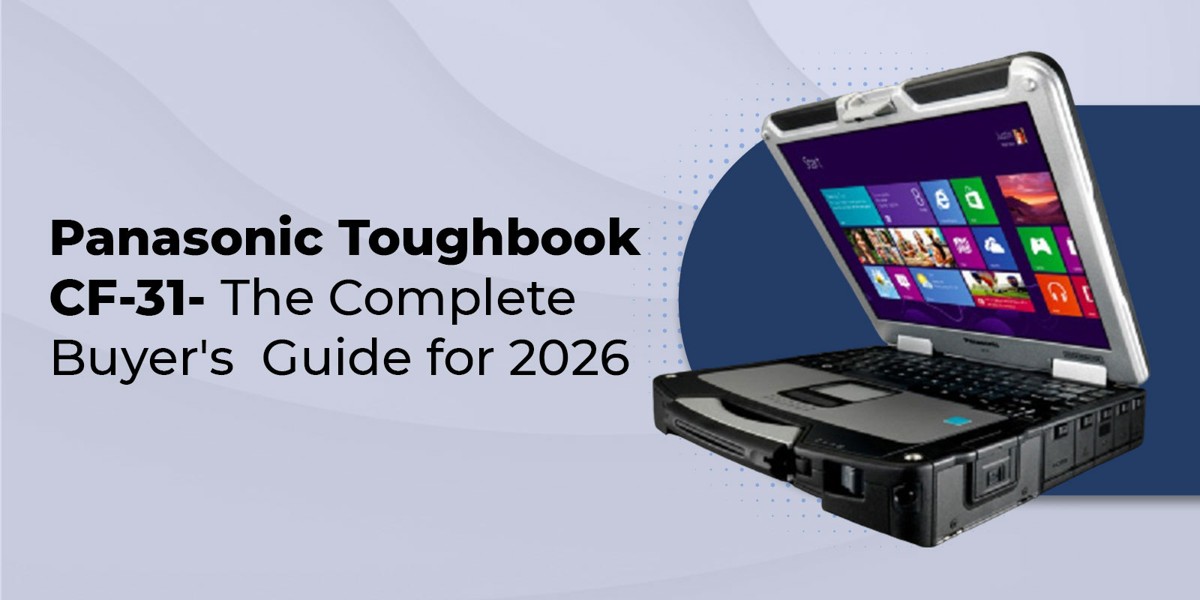
The Panasonic Toughbook CF-31 is a fully rugged 13.1-inch laptop built for field service, public safety, military, and industrial work. Produced from 2010 through 2018 across six generations (MK1 through MK6), it carries MIL-STD-810G certification, an IP65 rating, and a magnesium alloy chassis.
This guide walks through every CF-31 generation, explains which models still receive Windows 11 support, maps each version to the industries that deploy it, and gives you an honest answer on whether buying a refurbished CF-31 still makes sense in 2026.
What Is the Panasonic Toughbook CF-31?
The CF-31 is the sixth generation of Panasonic's flagship fully rugged laptop platform, a line that stretches back to the original CF-25 released in 1996. When Panasonic launched the CF-31 in 2010, it replaced the CF-30 while keeping full backward compatibility with vehicle docks and peripherals designed for the CF-27, CF-28, CF-29, and CF-30. That dock compatibility chain protected more than a decade of fleet hardware investment for the agencies and operators using it.
Every CF-31 ships with a magnesium-alloy chassis, a shock-mounted hard-drive caddy, spring-loaded port covers, and an integrated carrying handle. The 13.1-inch sunlight-readable touchscreen runs at 1200 nits on later generations, which is brighter than nearly any consumer laptop and remains legible in direct outdoor sun. The keyboard is spill-resistant up to 200 ml of liquid, and the entire unit is rated to withstand a 6-foot drop while in use.
Panasonic produced the CF-31 in six revisions before officially discontinuing the model. The final MK6 iteration shipped from late 2018 into 2019 with 7th-generation Intel Core i5 and i7 processors, 16 GB of RAM standard (expandable to 64 GB on MK6), an SSD by default, and a DVD drive option that has since been retired across the rest of the Toughbook range.
What Does CF-31 Stand For?
The "CF" prefix in Panasonic's Toughbook line traces back to the original ruggedized clamshell platform and has been applied to every full-size Toughbook laptop since the CF-25. The "31" identifies this unit as the sixth iteration of the full-size rugged laptop line, following the CF-25, CF-27, CF-28, CF-29, and CF-30. Panasonic switched to FZ-prefix naming for the tablet and 2-in-1 line beginning with the Toughpad family.
Panasonic Toughbook CF-31 Specifications by MK Generation
The CF-31 hardware changed substantially across its six generations. The chassis and footprint stayed the same, but the processor, RAM ceiling, USB version, and Windows compatibility all shifted. This is the comparison most CF-31 buyers ask for and the one no other rugged laptop guide currently provides in one table-
|
Gen |
Release |
Processor |
Max RAM |
USB |
Windows support |
|---|---|---|---|---|---|
|
MK1 |
2010 |
Intel Core i5-540M (1st gen) |
8 GB |
USB 2.0 only |
Up to Windows 10 |
|
MK2 |
2011 |
Intel Core i5-2520M (2nd gen) |
8 GB |
USB 2.0 only |
Up to Windows 10 |
|
MK3 |
2012 |
Intel Core i5-3340M (3rd gen) |
16 GB |
USB 3.0 added |
Up to Windows 10 |
|
MK4 |
2013-2014 |
Intel Core i5-3340M / i5-4310U |
16 GB |
USB 3.0 |
Windows 10 and Windows 11 |
|
MK5 |
2015-2016 |
Intel Core i5-5300U (5th gen) |
16 GB (32 GB unofficial) |
USB 3.0 |
Windows 10 and Windows 11 |
|
MK6 |
2018-2019 |
Intel Core i5-7300U / i7 (7th gen) |
64 GB |
USB 3.0 |
Windows 10 and Windows 11 |
Which CF-31 MK Supports Windows 11?
Only the CF-31 MK4, MK5, and MK6 generations support Windows 11. MK1, MK2, and MK3 are limited to Windows 10 because they lack the TPM 2.0 module and the supported processor generation Microsoft requires for Windows 11.
This matters more than it used to. Microsoft ended free security updates for Windows 10 in October 2025. Agencies and field operations still running CF-31 MK1, MK2, or MK3 units on Windows 10 are now operating without monthly security patches unless they pay for the Extended Security Updates program, which is intended as a bridge rather than a permanent solution.
A practical buying rule for 2026 deployments- if the unit will hold sensitive data, connect to a corporate VPN, or process payment information, choose MK4 or higher and confirm Windows 11 is either installed or that the seller has tested the in-place upgrade. MK6 ships with Windows 11 ready and supports up to 64 GB of RAM, which gives the longest useful service horizon of any CF-31 generation.
Toughbook CF-31 Ruggedness- MIL-STD-810G, IP65, and Real-World Survival
Ruggedness is why the CF-31 is still specified in law enforcement and utility contracts a decade after launch. The specifications are not marketing claims- they are tested certifications-
- MIL-STD-810G- Survives a 6-foot drop to plywood while operating, plus tested for vibration, shock, altitude, humidity, sand, dust, and temperature extremes from minus 20 to 145 degrees Fahrenheit.
- IP65- Dust-tight and resistant to water jets from any direction. This is water-resistant, not waterproof. The CF-31 is not rated for submersion.
- MIL-STD-461F- Electromagnetic interference compliance, important for in-vehicle deployment near radio equipment.
- ANSI/ISA 12.12.01- Hazardous location compliance for use in environments with potentially flammable atmospheres.
- ISO 7637-2- Vehicle electrical environment compliance for use in patrol cars, utility trucks, and other in-vehicle docked installations.
The spill-resistant keyboard is rated to handle 200 ml of liquid without damaging the unit. The magnesium alloy chassis weighs 8.2 pounds (3.7 kg), which is heavier than a consumer laptop but standard for fully rugged 13-inch machines. The shock-mounted drive caddy keeps the SSD or hard drive isolated from physical impact, and on later generations, the SSD itself is the more reliable choice because it has no moving parts to dampen.
Which Industries Use the Panasonic Toughbook CF-31?
The CF-31 is in active deployment across a defined set of industries where ruggedness, vehicle dock compatibility, and proven legacy software support matter more than the latest hardware. This table maps each common deployment to the recommended generation-
|
Industry/use case |
Recommended MK |
Why this generation |
|---|---|---|
|
Law enforcement (patrol vehicle MDT) |
MK5 or MK6 |
Windows 11 ready, 16 GB RAM minimum, backlit keyboard, optional 4G LTE, dual pass-through antenna |
|
Military/defense field operations |
MK5 or MK6 |
TPM 2.0, FIPS-compatible SSD options, Windows 11, MIL-STD-461F compliance |
|
Utilities and field service |
MK4 or higher |
USB 3.0 for modern test equipment, sunlight-readable display, and hazardous location rating |
|
Construction site documentation |
MK4 or higher |
1200-nit sunlight readability, GPS option, 200ml spill resistance |
|
Automotive diagnostics |
MK4 or higher |
USB 3.0 throughput for modern OBD-II scan tools, RS-232 legacy port retained |
|
Emergency response/fire / EMS |
MK5 or MK6 |
Lightest weight in the line, backlit keyboard, Windows 11 for CAD integration |
|
Legacy fleet replacement (existing CF-27 to CF-30 docks) |
Any MK |
Same vehicle dock interface across all six generations, lowest swap-in cost |
Is the Panasonic Toughbook CF-31 Still Worth Buying in 2026?
The honest answer is yes for specific use cases and no for others. Panasonic officially discontinued the CF-31 in 2018-2019 when MK6 production ended. It was replaced in the active Panasonic lineup first by the Toughbook 33 in 2017, then by the current Toughbook 40 flagship. The CF-31 itself is now a refurbished-only purchase.
When the CF-31 Still Makes Sense
Several deployment scenarios still favor a refurbished CF-31 over a current-generation rugged laptop. The first is legacy software dependency- field applications written for older Windows versions or specific drivers often run more reliably on the hardware they were validated against. The second is vehicle dock investment protection. An agency with a fleet of CF-27, CF-28, CF-29, or CF-30 vehicle docks can drop a CF-31 directly into existing infrastructure with no new mounting hardware, wiring, or retraining.
Budget is the third factor. A refurbished MK5 or MK6 in the United States runs from roughly $450 to $1,200, depending on configuration and warranty. A new Toughbook 40 starts north of $4,000. For an agency standing up 50 patrol vehicles, that price difference funds the entire deployment.
When to Look at a Newer Model
The CF-31 is the wrong choice when the deployment needs current-generation security hardware (Microsoft Pluton, hardware-based AI acceleration), modern connectivity (Thunderbolt 4, USB-C, Wi-Fi 6E or 7), or a 16-10 aspect ratio. The CF-31 display is 4-3 XGA at 1024 by 768 resolution, which feels constrained for modern dual-pane workflows.
If the use case involves heavy multimedia, AI-assisted field analysis, or running multiple modern Windows 11 applications simultaneously, look at the Toughbook 33 (a 12-inch detachable 2-in-1) or the Toughbook 40 flagship, both of which the manufacturer sells new through authorized channels and which we stock in current configurations.
Common Issues to Watch For on a Refurbished CF-31
Every refurbished CF-31 has been used, often for years, and a few specific components are known wear points worth checking before purchase-
- Power port soldered to system board- The DC-in jack is part of the motherboard. If it fails, the entire system board must be replaced. Always be gentle when plugging and unplugging the power adapter, and ask any seller about the port condition.
- Battery degradation- Panasonic specified 19.5 hours of battery life when these units were new. Real-world refurbished CF-31 batteries typically deliver 3 to 6 hours, depending on age and cycle count. Always ask for the battery health percentage before purchase.
- Cooling fan noise on MK4 and later- The 35-watt TDP processors in MK3 onward use an active cooling fan. After years of dust ingress, fans get noisy. Replacement fans are available, but factor that into the total cost.
- Touchpad sensitivity- The CF-31 touchpad is small and requires firm input. Some users report intermittent cursor jumps that warm up with use. The touchscreen is the more reliable input on this platform.
- Touchscreen digitizer wear- On heavily used units, the digitizer film can develop dead zones or pen tracking issues. Confirm full-screen response before deployment.
- Hard drive caddy seal- The shock-mounted caddy uses a rubber gasket that can dry out and lose its seal over time. Inspect the caddy if the unit will see frequent drive swaps.
How the CF-31 Compares to Other Fully Rugged Laptops
Three current options compete with the refurbished CF-31 at different price and capability points-
The Dell Rugged Extreme 5430 is a 14-inch fully rugged laptop with current Intel processors, USB-C, Thunderbolt, and Wi-Fi 6. It is the closest current alternative if you do not need backward compatibility with older Panasonic infrastructure for vehicle docking. Pricing is mid-range new, and it carries similar MIL-STD-810H and IP65 certifications.
The Toughbook 33 is Panasonic's direct successor to the CF-31 in the rugged laptop lineup. It is a 12-inch detachable 2-in-1 with a QHD touchscreen and the same magnesium-alloy chassis. It is lighter, more flexible, and better suited to workflows that need a tablet mode. New, it costs three to four times as much as a refurbished CF-31 MK6.
The Toughbook 40 is Panasonic's current flagship rugged laptop. It runs current Intel Core Ultra processors, supports modular xPAK expansion bays, and weighs less than the CF-31 despite being larger. It is the right choice for a green-field deployment where there is no existing dock infrastructure to protect.
For agencies and operators who already own the docking infrastructure or who need to deploy at the lowest cost per unit, the CF-31 still wins. For a brand-new deployment with no legacy hardware on site, one of the three newer options is the better long-term call.
Frequently Asked Questions
1. What does CF-31 stand for in Panasonic Toughbook?
The "CF" prefix designates Panasonic's full-size ruggedized clamshell laptop platform, used since the original CF-25 in 1996. The number 31 identifies this unit as the sixth generation in that line, following the CF-25, CF-27, CF-28, CF-29, and CF-30. Panasonic uses the FZ prefix for its rugged tablets and 2-in-1 devices.
2. Is the Panasonic Toughbook CF-31 still worth buying in 2026?
Yes, for specific use cases. A refurbished MK5 or MK6 makes sense for agencies replacing units in existing CF-27 to CF-30 dock infrastructure, for legacy software environments, and for fleet deployments where budget matters more than the latest hardware. For green-field deployments with no legacy hardware, a newer Toughbook 33, Toughbook 40, or Dell Rugged Extreme is the better long-term choice.
3. Which CF-31 MK supports Windows 11?
Only the CF-31 MK4, MK5, and MK6 generations support Windows 11. MK1, MK2, and MK3 are limited to Windows 10 because they lack the TPM 2.0 module and the supported processor generation required by Microsoft for Windows 11 installation. Confirm Windows 11 readiness with the seller before purchase.
4. What is the difference between CF-31 MK4, MK5, and MK6?
MK4 uses 3rd- or 4th-generation Intel Core i5 processors with a maximum of 16 GB of RAM. MK5 moves to 5th-generation Intel Core i5-5300U and adds Windows 11 support out of the box. MK6 is the final generation with 7th-generation Intel Core i5 or i7 processors, 16 GB standard RAM expandable to 64 GB, and an SSD by default. MK6 has the longest service horizon.
5. What is the battery life of the Panasonic Toughbook CF-31?
Panasonic specified up to 19.5 hours of battery life on a new MK5 or MK6 unit with the standard battery, or up to 28.5 hours with the optional media bay second battery. In real-world refurbished use, expect 3 to 6 hours depending on battery age and cycle count. Always ask the seller for the current battery health percentage before purchase.
6. Is the Panasonic Toughbook CF-31 waterproof?
The CF-31 is water-resistant, not waterproof. It carries an IP65 rating, that makes it dust-tight and can withstand water jets from any direction without damage. It is not rated for submersion. The spill-resistant keyboard is tested to handle 200 ml of liquid without affecting operation, but the unit should not be submerged.
7. How much RAM can a Panasonic Toughbook CF-31 support?
The maximum supported RAM depends on the generation. MK1 and MK2 support up to 8 GB. MK3, MK4, and MK5 officially support up to 16 GB, though some MK5 units can run 32 GB with compatible DDR3 modules. MK6 is the only CF-31 generation that supports up to 64 GB of RAM, which makes it the best choice for memory-intensive applications.
8. What industries use the Panasonic Toughbook CF-31?
Active CF-31 deployments are concentrated in law enforcement and public safety (patrol vehicle mobile data terminals), military and defense field operations, utilities and field service, construction site documentation, automotive diagnostics, emergency response (fire and EMS), and any fleet operation with existing CF-27 to CF-30 vehicle dock infrastructure.