Panasonic Toughbook CF-33 Guide: Generations, Configurations and Buying Checklist
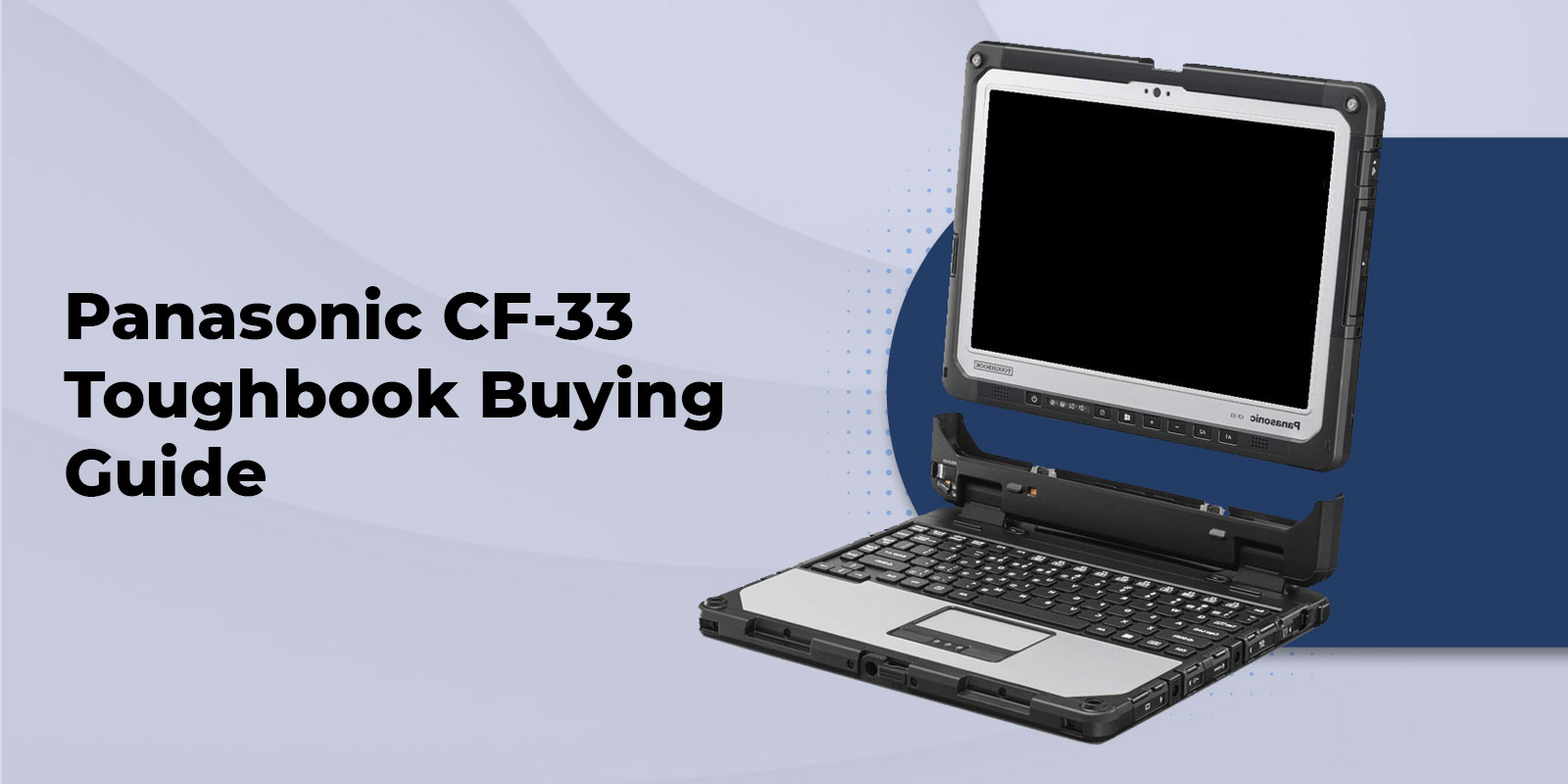
The Panasonic Toughbook CF-33 is a fully rugged detachable Windows computer built for work that moves between a vehicle, desk, job site, and field location. Its 12-inch display separates from the keyboard, so one system can cover mobile tablet work and longer-form laptop tasks.
That flexibility is valuable only when the configuration fits the job. CF-33 systems span several generations, and units that look alike can differ in processor platform, memory, storage, wireless hardware, ports, keyboard compatibility, batteries, and rugged testing documentation. This guide explains what to verify before purchasing a new or refurbished CF-33.
What the CF-33 detachable 2-in-1 is built to do
A detachable differs from a convertible laptop because the keyboard can be removed entirely. With the CF-33 docked, users have a physical keyboard for reports, data entry, dispatch work, and vehicle-based computing. Detached, the display becomes a handheld Windows tablet for inspections, equipment checks, forms, photos, mapping, and field documentation.
This format is particularly practical for public safety, utilities, field service, industrial maintenance, construction, and inspection teams whose work changes location during a shift. A vehicle-mounted setup may call for a keyboard and dock, while a walk-around task may be better handled with the tablet, touch input, and digitizer.
The right question is not whether a detachable is more versatile on paper. It is whether one person genuinely needs both working positions. If nearly all work is typed at a desk or in a vehicle, a traditional rugged laptop may be the better fit. If handheld use dominates and extended typing is occasional, a tablet-first system may make more sense.
Panasonic Toughbook CF-33 generations: Mk1, Mk2, Mk3 and Mk4
The CF-33 product name covers multiple hardware generations. Start every evaluation by confirming the exact Mk generation and full model number, rather than relying on a general CF-33 description.
|
Generation |
Platform distinction |
What to verify before purchase |
|
Mk1 |
Earlier CF-33 platform |
Exact processor, installed RAM and SSD, wireless card, LTE/GPS hardware, keyboard, and condition |
|
Mk2 |
Updated platform with newer Intel processing than Mk1 |
Processor, memory, storage, Windows compatibility, USB-C and wireless configuration |
|
Mk3 |
Later-generation CF-33 platform |
Exact CPU, RAM, SSD, port configuration, keyboard and dock compatibility |
|
Mk4 |
Current-generation platform |
Processor choice, installed memory and storage, 4G or 5G configuration, integrated options, and accessory requirements |
Processor generation is an important dividing line. Mk1 systems use earlier Intel hardware, Mk2 moved to 10th Generation Intel Core processors, Mk3 uses 12th Generation Intel Core processors, and Mk4 uses 13th Generation Intel Core processors. That progression affects performance, operating system planning, wireless capabilities, and the options available on a particular unit.
Model numbers should be confirmed against the unit label and the applicable specification sheet before ordering. [Add: verified model-number table for units currently offered, including processor, RAM, SSD, wireless hardware, and included keyboard.]
CF-33 specifications vary by configuration
A CF-33 is not one fixed specification. Even within the same generation, factory options and later upgrades can change the practical fit for a deployment.
Focus on the details that affect the applications and accessories your team will actually use:
- Processor and memory: Match these to the software load, number of concurrent applications, browser-based systems, mapping, diagnostics, and local data processing.
- SSD capacity and security: Confirm installed storage capacity, SSD type, encryption requirements, and whether the drive arrangement meets your organization's service procedures.
- Keyboard choice: Verify whether the unit includes a keyboard, and identify whether it is a Lite or Premium Keyboard. The keyboard affects typing ergonomics, ports, docks, and vehicle use.
- Cellular and GPS: Do not assume LTE, 5G, GPS, or carrier support from the CF-33 name. Confirm the installed modem and positioning hardware on the exact system.
- Integrated field options: Barcode scanning, true serial, additional USB, smart-card, contactless-card, and fingerprint options are configuration dependent.
- Battery setup: Confirm whether standard or long-life batteries are installed, their condition on refurbished systems, and whether the chosen setup affects docking or mounting plans.
For a fleet, configuration control matters as much as the headline specification. Standardizing the same generation, keyboard, modem, SSD capacity, and dock arrangement simplifies support and replacement planning.
Display, touch input and stylus use in the field
The current CF-33 platform is documented with a 12-inch QHD, 3:2 multi-touch and digitizer display rated at 1,200 nits. The taller 3:2 format provides more vertical workspace than a widescreen layout, which can be useful when reviewing forms, work orders, CAD views, or inspection records.
Applicable CF-33 configurations support touch interaction and digitizer input. That combination suits workflows where a user may tap through a form while standing, then use the pen for signatures, annotations, or more precise input. Confirm touch modes, stylus inclusion, brightness, and display specifications for the generation being considered, especially when purchasing refurbished equipment.
Outdoor readability is not only a brightness specification. Screen condition, anti-reflective treatment, display settings, battery state, and the way the device is mounted all affect day-to-day usability. A field evaluation should reflect the actual viewing angle, protective equipment, gloves, and lighting conditions users encounter.
Ruggedness, IP ratings and compliance documentation
Rugged credentials must be matched to the specific CF-33 generation and configuration. Older documentation may reference MIL-STD-810G and MIL-STD-461F, while the current Panasonic CF-33 platform lists MIL-STD-810H, MIL-STD-461G, and IP65 testing. Optional hazardous-location capability also needs configuration-level confirmation.
IP65 indicates protection against dust ingress and water jets. It does not mean a device is designed for submersion. Likewise, MIL-STD testing describes testing against defined methods and conditions. It should not be treated as a blanket promise that every unit will withstand every drop, vibration event, temperature exposure, or installation environment.
Before a procurement decision, obtain the applicable documentation for the exact model and intended use:
- [Add: verified rugged testing and certification details for the offered CF-33 model]
- [Add: verified drop-test documentation, including whether the rating applies to tablet-only or keyboard-attached use]
- [Add: verified hazardous-location option and model applicability, if required]
- [Add: verified electromagnetic compatibility documentation when radios, antennas, or sensitive equipment are involved]
This is especially important for government, public-safety, industrial, and defense requirements where a contract may specify a particular revision of a standard or a defined environmental test method.
Connectivity, ports, docks and field options
The CF-33 can be configured around a field workflow rather than treated as a generic laptop. Depending on generation and installed options, the platform may support Wi-Fi, Bluetooth, GPS, 4G LTE, 5G, Ethernet, HDMI, USB, serial connectivity, smart-card readers, fingerprint readers, barcode scanning, and docking hardware.
On the current platform, documented tablet connectivity includes Thunderbolt 4 USB-C, USB-A, HDMI, Ethernet, optional true serial, optional MicroSDXC, audio, dual SIM support, and a docking connector. The Premium Keyboard adds its own expansion options, including USB-A ports, SDXC, HDMI, VGA, Ethernet, serial connectivity, and a docking connector.
Compatibility should be checked at the system level. A vehicle dock, keyboard, long-life battery, hand strap, modem, or quick-release storage option can affect which accessories work together. Keyboard compatibility also differs across generations: Mk3 and Mk4 Premium Keyboards are not compatible with Mk1 or Mk2 tablets, while Mk3 and Mk4 tablets can work with earlier CF-33 keyboards.
For vehicle deployments, confirm the exact tablet generation, keyboard or vehicle dock adapter, mount, power solution, antenna routing, and any required port access before ordering. A dock that physically fits is not necessarily the right solution for the installed battery, hand strap, or workflow.
New and refurbished CF-33 buying checklist
A used CF-33 can be a sensible purchase when its generation and configuration meet the work requirement. The lower acquisition cost of an older platform is only useful if it does not create a gap in software performance, connectivity, battery runtime, or accessory compatibility.
Use this checklist to compare systems on an equal basis:
- Confirm the exact unit. Record the Mk generation, full model number, processor, RAM, SSD capacity, installed operating system, and BIOS status.
- Inspect condition and refurbishment scope. Ask how cosmetic condition is graded, what functional testing was completed, whether ports, touch input, cameras, latches, seals, and keyboard connection were checked, and what parts were replaced.
- Check battery health and configuration. Verify the number of batteries included, whether they are standard or long-life units, their tested condition, and whether hot-swap operation has been checked.
- Verify the keyboard and accessories. Confirm whether the keyboard is included, which keyboard type it is, and whether the charger, stylus, hand strap, dock, or other required equipment is part of the order.
- Validate radios and location services. Identify installed Wi-Fi, Bluetooth, LTE or 5G modem, SIM arrangement, GPS, and antenna requirements. Do not assume an empty SIM slot means cellular hardware is installed.
- Match the unit to the dock and mount. Check compatibility before purchase, particularly when reusing vehicle equipment or mixing CF-33 generations across a fleet.
- Review support terms. Confirm the warranty, return policy, battery coverage, and any configuration or deployment support for the exact unit being purchased. [Add: current Tough Rugged Laptops warranty and return terms.]
A complete quote should identify the configuration, included equipment, and support terms in writing. That makes it easier to compare offers and prevents a tablet-only unit from being mistaken for a ready-to-deploy laptop package.
Choosing the right CF-33 configuration
Start with the work environment and software, then add the options that solve a real operational need. A technician connecting to legacy equipment may need true serial connectivity. A vehicle-based public-safety workflow may require cellular service, GPS, a dock, and security hardware. A logistics or inspection team may benefit from a barcode reader and a digitizer-equipped display.
Long-life batteries can be appropriate for extended shifts away from power, but they should be selected with the mounting plan in mind. Cellular hardware is useful for wide-area connectivity, yet it should be specified around carrier coverage, antenna needs, data plans, and the generation of the CF-33. More storage and memory are worthwhile when applications, images, mapping files, or multitasking actually require them.
Our team can help compare new and refurbished CF-33 configurations, confirm accessories, and build a quote around your deployment requirements. Review current new CF-33 configurations, explore refurbished CF-33 options, or contact us to discuss a system for your vehicles, field staff, or fleet.
Frequently asked questions
1. Is the Panasonic Toughbook CF-33 a laptop or a tablet?
It is a detachable 2-in-1. The display can operate as a standalone Windows tablet or attach to a compatible keyboard for laptop-style work.
2. What is the difference between a CF-33 Mk1, Mk2, Mk3 and Mk4?
The generations differ in processor platform and available capabilities. Mk1 uses earlier Intel hardware, Mk2 uses 10th Generation Intel Core processors, Mk3 uses 12th Generation Intel Core processors, and Mk4 uses 13th Generation Intel Core processors. Exact ports, wireless hardware, memory, storage, and accessory compatibility must still be verified by model and configuration.
3. Are all CF-33 units IP65 and MIL-STD tested?
Rugged testing documentation varies by generation and configuration. Older CF-33 documentation references MIL-STD-810G and MIL-STD-461F, while the current platform lists MIL-STD-810H, MIL-STD-461G, and IP65. Confirm the applicable documentation for the exact system before relying on it for a procurement requirement.
4. Does a CF-33 include a keyboard?
Keyboard inclusion depends on the listing or quoted configuration. Confirm whether the system is tablet-only or includes a Lite or Premium Keyboard before purchasing.
5. Can a refurbished CF-33 have LTE or GPS?
It may, but these are configuration-dependent options. Verify the installed modem, GPS hardware, SIM support, carrier compatibility, and antenna requirements for the exact refurbished unit.
6. Can I reuse an existing CF-33 dock or keyboard?
Possibly, but compatibility must be checked by generation and accessory model. This is particularly important for Mk3 and Mk4 keyboards, long-life battery arrangements, vehicle docks, and adapters.